The second edition of Think DSP is not for sale yet, but if you would like to support this project, you can contribute through Green Tea Press.
4. Noise#
In English, “noise” means an unwanted or unpleasant sound. In the context of signal processing, it has two different senses:
As in English, it can mean an unwanted signal of any kind. If two signals interfere with each other, each signal would consider the other to be noise.
“Noise” also refers to a signal that contains components at many frequencies, so it lacks the harmonic structure of the periodic signals we saw in previous chapters.
This chapter is about the second kind.
Click here to run this notebook on Colab.
np.random.seed(17)
4.1. Uncorrelated Noise#
The simplest way to understand noise is to generate it, and the simplest kind to generate is uncorrelated uniform noise (UU noise). “Uniform” means the signal contains random values from a uniform distribution; that is, every value in the range is equally likely. “Uncorrelated” means that the values are independent; that is, knowing one value provides no information about the others.
Here’s a class that represents UU noise:
from thinkdsp import Noise
class UncorrelatedUniformNoise(Noise):
def evaluate(self, ts):
ys = np.random.uniform(-self.amp, self.amp, len(ts))
return ys
UncorrelatedUniformNoise inherits from _Noise, which inherits from Signal.
As usual, the evaluate function takes ts, the times when the signal should be evaluated.
It uses np.random.uniform, which generates values from a uniform distribution.
In this example, the values are in the range between -amp to amp.
The following example generates UU noise with duration 0.5 seconds at 11,025 samples per second.
from thinkdsp import UncorrelatedUniformNoise
signal = UncorrelatedUniformNoise()
wave = signal.make_wave(duration=0.5, framerate=11025)
wave.make_audio()
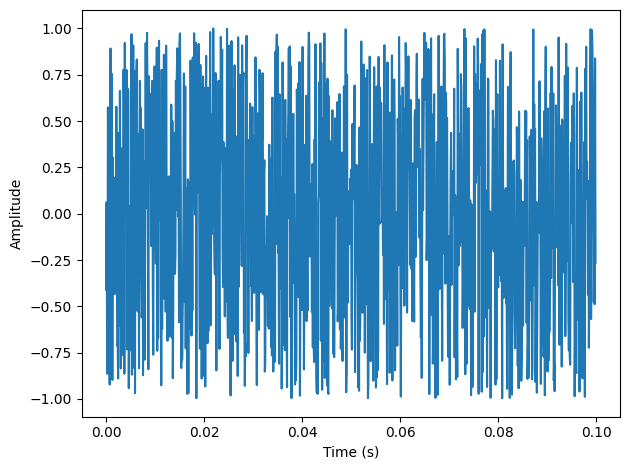
If you play this wave, it sounds like the static you hear if you tune a radio between channels. The following figure shows what the waveform looks like. As expected, it looks pretty random.
Here’s what a segment of it looks like:
segment = wave.segment(duration=0.1)
segment.plot()
decorate_time()
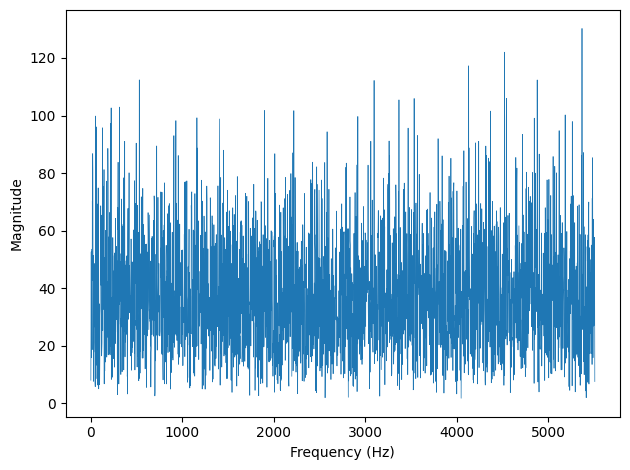
Now let’s take a look at the spectrum:
spectrum = wave.make_spectrum()
spectrum.plot(linewidth=0.5)
decorate_freq()
In the context of noise it is more conventional to look at the spectrum of power, which is the square of amplitude:
spectrum.plot_power(linewidth=0.5)
decorate_power()
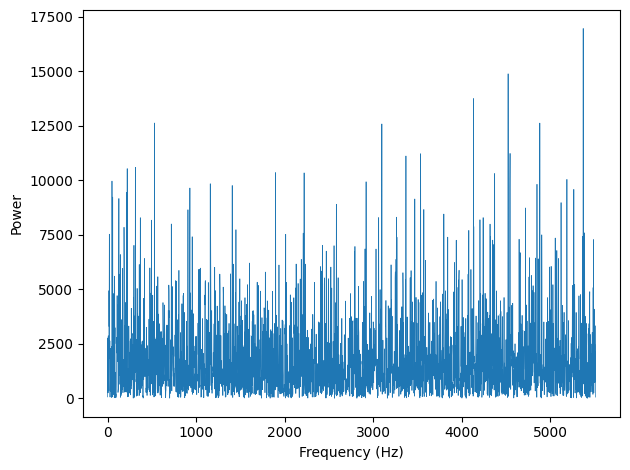
Spectrum.plot_power is similar to Spectrum.plot, except that it plots power instead of amplitude.
Power is the square of amplitude.
I am switching from amplitude to power in this chapter because it is more conventional in the context of noise.
The following figure shows the result. Like the signal, the spectrum looks pretty random. In fact, it is random, but we have to be more precise about the word “random”. There are at least three things we might like to know about a noise signal or its spectrum:
Distribution: The distribution of a random signal is the set of possible values and their probabilities. For example, in the uniform noise signal, the set of values is the range from -1 to 1, and all values have the same probability. An alternative is Gaussian noise, where the set of values is the range from negative to positive infinity, but values near 0 are the most likely, with probability that drops off according to the Gaussian or “bell” curve.
Correlation: Is each value in the signal independent of the others, or are there dependencies between them? In UU noise, the values are independent. An alternative is Brownian noise, where each value is the sum of the previous value and a random “step”. So if the value of the signal is high at a particular point in time, we expect it to stay high, and if it is low, we expect it to stay low.
Relationship between power and frequency: In the spectrum of UU noise, the power at all frequencies is drawn from the same distribution; that is, the average power is the same for all frequencies. An alternative is pink noise, where power is inversely related to frequency; that is, the power at frequency \(f\) is drawn from a distribution whose mean is proportional to \(1/f\).
4.2. Integrated Spectrum#
For UU noise we can see the relationship between power and frequency more clearly by looking at the integrated spectrum, which is a function of frequency, \(f\), that shows the cumulative power in the spectrum up to \(f\).
Spectrum provides a method that computes the IntegratedSpectrum:
def make_integrated_spectrum(self):
cs = np.cumsum(self.power)
cs /= cs[-1]
return IntegratedSpectrum(cs, self.fs)
self.power is a NumPy array containing power for each frequency.
np.cumsum computes the cumulative sum of the powers.
Dividing through by the last element normalizes the integrated spectrum so it runs from 0 to 1.
The result is an IntegratedSpectrum. Here is the class definition:
class IntegratedSpectrum(object):
def __init__(self, cs, fs):
self.cs = cs
self.fs = fs
Like Spectrum, IntegratedSpectrum provides plot_power, so we can compute and plot the integrated spectrum like this:
integ = spectrum.make_integrated_spectrum()
integ.plot_power()
decorate_power()
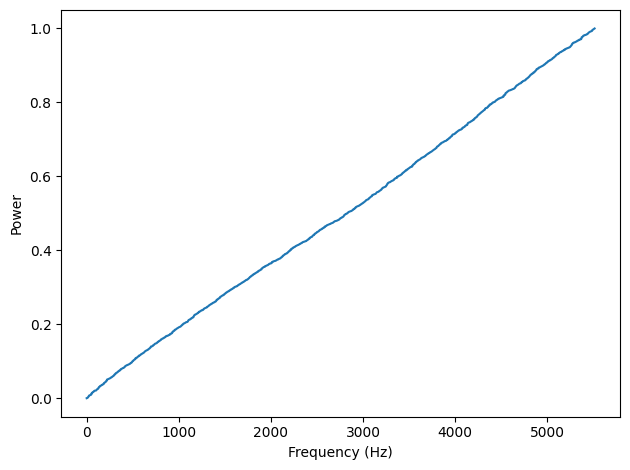
The result is a straight line, which indicates that power at all frequencies is constant, on average. Noise with equal power at all frequencies is called white noise by analogy with light, because an equal mixture of light at all visible frequencies is white.
UU noise has the same power at all frequencies, on average, which we can confirm by looking at the normalized cumulative sum of power, which I call an integrated spectrum.
A straight line in this figure indicates that UU noise has equal power at all frequencies, on average. By analogy with light, noise with this property is called “white noise”.
4.3. Brownian Noise#
UU noise is uncorrelated, which means that each value does not depend on the others. An alternative is Brownian noise, in which each value is the sum of the previous value and a random “step”.
It is called “Brownian” by analogy with Brownian motion, in which a particle suspended in a fluid moves apparently at random, due to unseen interactions with the fluid. Brownian motion is often described using a random walk, which is a mathematical model of a path where the distance between steps is characterized by a random distribution.
In a one-dimensional random walk, the particle moves up or down by a random amount at each time step. The location of the particle at any point in time is the sum of all previous steps.
This observation suggests a way to generate Brownian noise: generate uncorrelated random steps and then add them up. Here is a class definition that implements this algorithm:
class BrownianNoise(Noise):
def evaluate(self, ts):
dys = np.random.uniform(-1, 1, len(ts))
ys = np.cumsum(dys)
ys = normalize(unbias(ys), self.amp)
return ys
evaluate uses np.random.uniform to generate an uncorrelated signal and np.cumsum to compute their cumulative sum.
Since the sum is likely to escape the range from -1 to 1, we have to use unbias to shift the mean to 0, and normalize to get the desired maximum amplitude.
Here’s the code that generates a BrownianNoise object:
from thinkdsp import BrownianNoise
signal = BrownianNoise()
wave = signal.make_wave(duration=0.5, framerate=11025)
wave.make_audio()
The sound is less bright, or more muffled, than white noise.
Here’s what the wave looks like:
wave.plot(linewidth=1)
decorate_time()
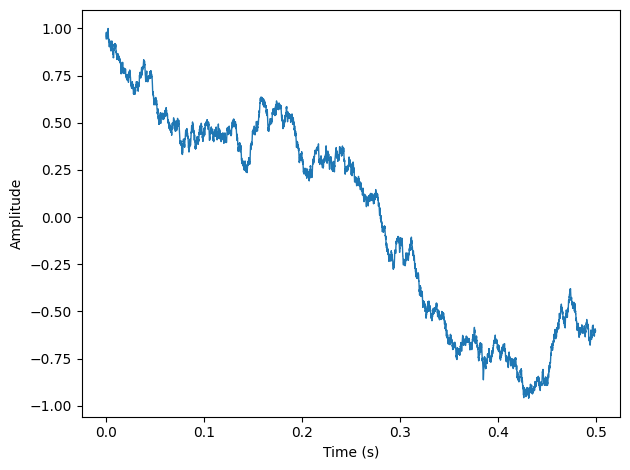
The waveform wanders up and down, but there is a clear correlation between successive values. When the amplitude is high, it tends to stay high, and vice versa.
If you plot the spectrum of Brownian noise on a linear scale, it doesn’t look like much. Nearly all of the power is at the lowest frequencies; the higher frequency components are not visible.
Here’s what the power spectrum looks like on a linear scale:
spectrum = wave.make_spectrum()
spectrum.plot_power(linewidth=0.5)
decorate_power()
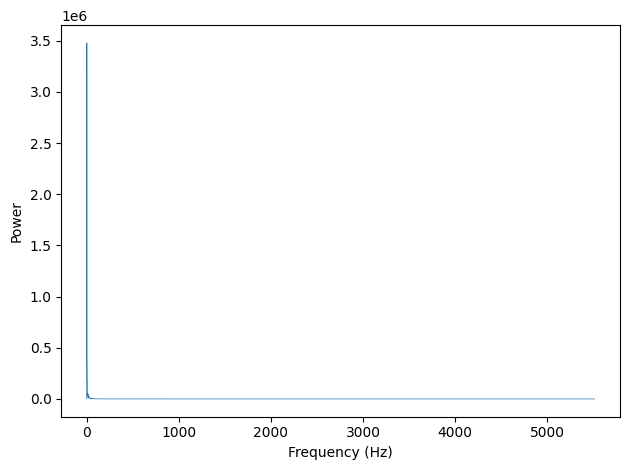
So much of the energy is at low frequencies, we can’t even see the high frequencies.
To see the shape of the spectrum more clearly, we can plot power and frequency on a log-log scale. Here’s the code:
# The f=0 component is very small, so on a log scale
# it's very negative. If we clobber it before plotting,
# we can see the rest of the spectrum more clearly.
spectrum.hs[0] = 0
spectrum.plot_power(linewidth=0.5)
loglog = dict(xscale='log', yscale='log')
decorate_power(**loglog)
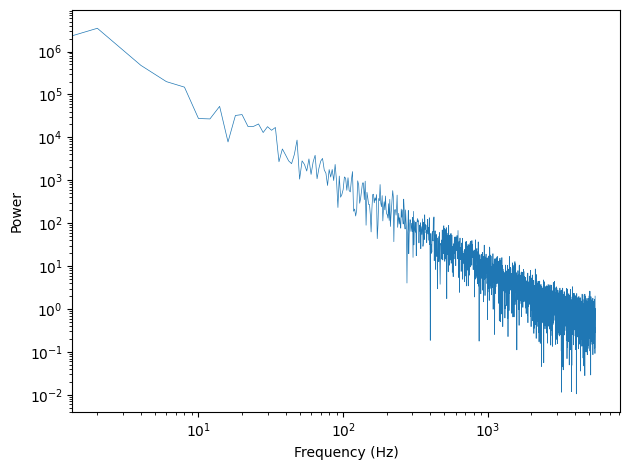
Now the relationship between power and frequency is clearer. The slope of this line is approximately -2, which indicates that \(P = K / f^2\), for some constant \(K\).
The relationship between power and frequency is noisy, but roughly linear.
Spectrum provides estimate_slope, which uses SciPy to compute a least squares fit to the power spectrum:
#class Spectrum
def estimate_slope(self):
x = np.log(self.fs[1:])
y = np.log(self.power[1:])
t = scipy.stats.linregress(x,y)
return t
It discards the first component of the spectrum because this component corresponds to \(f=0\), and \(\log 0\) is undefined.
estimate_slope returns the result from scipy.stats.linregress which is an object that contains the estimated slope and intercept, coefficient of determination (\(R^2\)), p-value, and standard error.
For our purposes, we only need the slope.
signal = BrownianNoise()
wave = signal.make_wave(duration=0.5, framerate=11025)
spectrum = wave.make_spectrum()
result = spectrum.estimate_slope()
result.slope
np.float64(-1.7846032211221765)
The estimated slope of the line is closer to -1.8 than -2, for reasons we’ll see later.
For Brownian noise, the slope of the power spectrum is -2 (we’ll see why in Chapter [diffint]{reference-type=“ref” reference=“diffint”}), so we can write this relationship: $\(\log P = k -2 \log f\)\( where \)P\( is power, \)f\( is frequency, and \)k\( is the intercept of the line, which is not important for our purposes. Exponentiating both sides yields: \)\(P = K / f^{2}\)\( where \)K\( is \)e^k\(, but still not important. More relevant is that power is proportional to \)1/f^2$, which is characteristic of Brownian noise.
Brownian noise is also called red noise, for the same reason that white noise is called “white”. If you combine visible light with power proportional to \(1/f^2\), most of the power would be at the low-frequency end of the spectrum, which is red. Brownian noise is also sometimes called “brown noise”, but I think that’s confusing, so I won’t use it.
4.4. Pink Noise#
For red noise, the relationship between frequency and power is $\(P = K / f^{2}\)\( There is nothing special about the exponent 2. More generally, we can synthesize noise with any exponent, \)\beta$.
When \(\beta = 0\), power is constant at all frequencies, so the result is white noise. When \(\beta=2\) the result is red noise.
When \(\beta\) is between 0 and 2, the result is between white and red noise, so it is called pink noise.
Pink noise is characterized by a parameter, \(\beta\), usually between 0 and 2. You can hear the differences below.
With \(\beta=0\), we get white noise:
from thinkdsp import PinkNoise
signal = PinkNoise(beta=0)
wave = signal.make_wave(duration=0.5)
wave.make_audio()
With \(\beta=1\), pink noise has the relationship \(P = K / f\), which is why it is also called \(1/f\) noise.
signal = PinkNoise(beta=1)
wave = signal.make_wave(duration=0.5)
wave.make_audio()
With \(\beta=2\), we get Brownian (aka red) noise.
signal = PinkNoise(beta=2)
wave = signal.make_wave(duration=0.5)
wave.make_audio()
There are several ways to generate pink noise.
The simplest is to generate white noise and then apply a low-pass filter with the desired exponent.
thinkdsp provides a class that represents a pink noise signal:
class PinkNoise(Noise):
def __init__(self, amp=1.0, beta=1.0):
self.amp = amp
self.beta = beta
amp is the desired amplitude of the signal.
beta is the desired exponent.
PinkNoise provides make_wave, which generates a Wave.
def make_wave(self, duration=1, start=0, framerate=11025):
signal = UncorrelatedUniformNoise()
wave = signal.make_wave(duration, start, framerate)
spectrum = wave.make_spectrum()
spectrum.pink_filter(beta=self.beta)
wave2 = spectrum.make_wave()
wave2.unbias()
wave2.normalize(self.amp)
return wave2
duration is the length of the wave in seconds.
start is the start time of the wave; it is included so that make_wave has the same interface for all types of signal, but for random noise, start time is irrelevant.
And framerate is the number of samples per second.
make_wave creates a white noise wave, computes its spectrum, applies a filter with the desired exponent, and then converts the filtered spectrum back to a wave.
Then it unbiases and normalizes the wave.
Spectrum provides pink_filter:
def pink_filter(self, beta=1.0):
denom = self.fs ** (beta/2.0)
denom[0] = 1
self.hs /= denom
pink_filter divides each element of the spectrum by \(f^{\beta/2}\).
Since power is the square of amplitude, this operation divides the power at each component by \(f^\beta\).
It treats the component at \(f=0\) as a special case, partly to avoid dividing by 0, and partly because this element represents the bias of the signal, which we are going to set to 0 anyway.
The following figure shows the resulting waveform. Like Brownian noise, it wanders up and down in a way that suggests correlation between successive values, but at least visually, it looks more random. In the next chapter we will come back to this observation and I will be more precise about what I mean by “correlation” and “more random”.
The following figure shows the power spectrums for white, pink, and red noise on a log-log scale:
betas = [0, 1, 2]
for beta in betas:
signal = thinkdsp.PinkNoise(beta=beta)
wave = signal.make_wave(duration=0.5, framerate=1024)
spectrum = wave.make_spectrum()
spectrum.hs[0] = 0
label = f'beta={beta}'
spectrum.plot_power(linewidth=1, alpha=0.7, label=label)
loglog = dict(xscale='log', yscale='log')
decorate_power(**loglog)
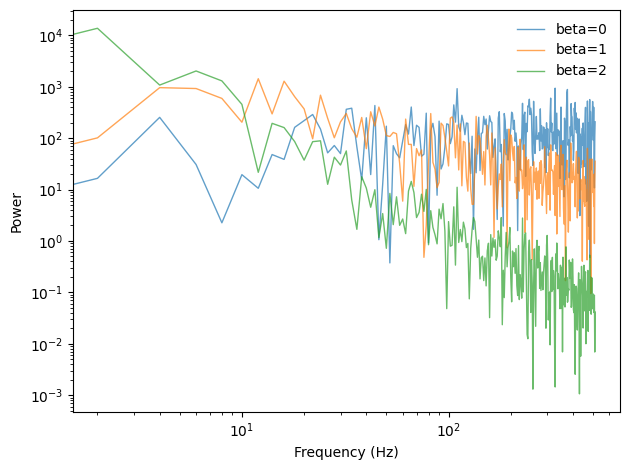
Finally, the following figure shows a spectrum for white, pink, and red noise on the same log-log scale. The relationship between the exponent, \(\beta\), and the slope of the spectrum is apparent in this figure.
4.5. Gaussian Noise#
We started with uncorrelated uniform (UU) noise and showed that, because its spectrum has equal power at all frequencies, on average, UU noise is white.
But when people talk about “white noise”, they don’t always mean UU noise. In fact, more often they mean uncorrelated Gaussian (UG) noise.
thinkdsp provides an implementation of UG noise:
class UncorrelatedGaussianNoise(Noise):
def evaluate(self, ts):
ys = np.random.normal(0, self.amp, len(ts))
return ys
np.random.normal returns a NumPy array of values from a Gaussian distribution, in this case with mean 0 and standard deviation self.amp.
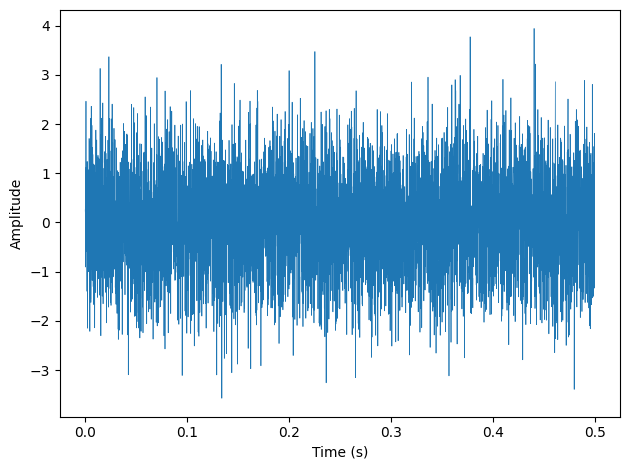
In theory the range of values is from negative to positive infinity, but we expect about 99% of the values to be between -3 and 3.
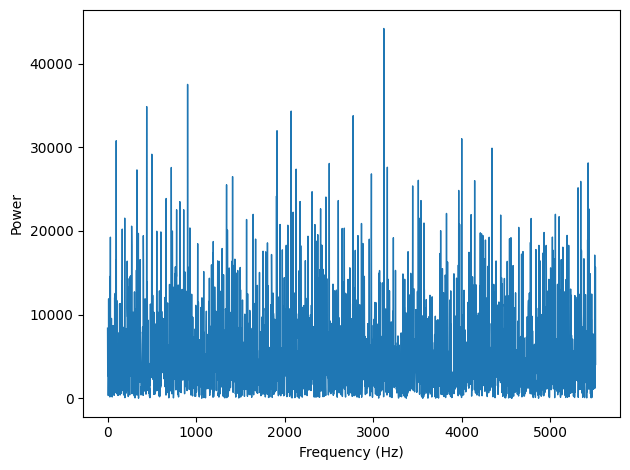
UG noise is similar in many ways to UU noise. The spectrum has equal power at all frequencies, on average, so UG is also white. And it has one other interesting property: the spectrum of UG noise is also UG noise. More precisely, the real and imaginary parts of the spectrum are uncorrelated Gaussian values.
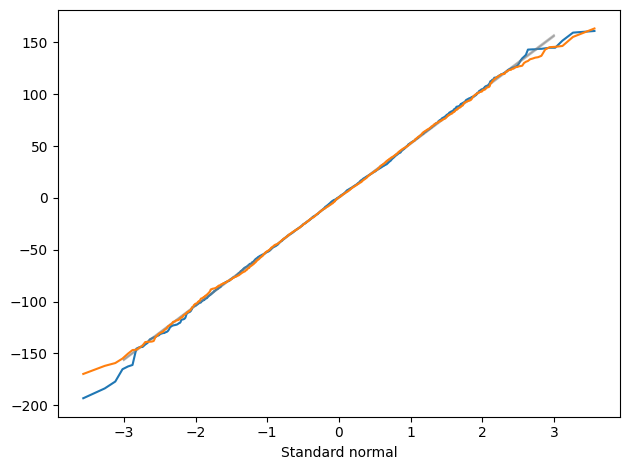
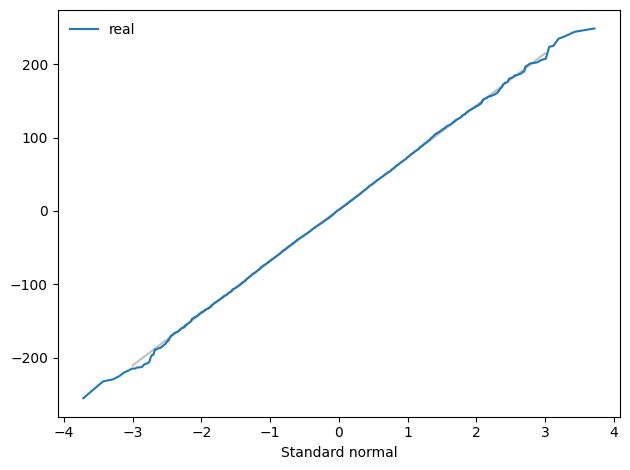
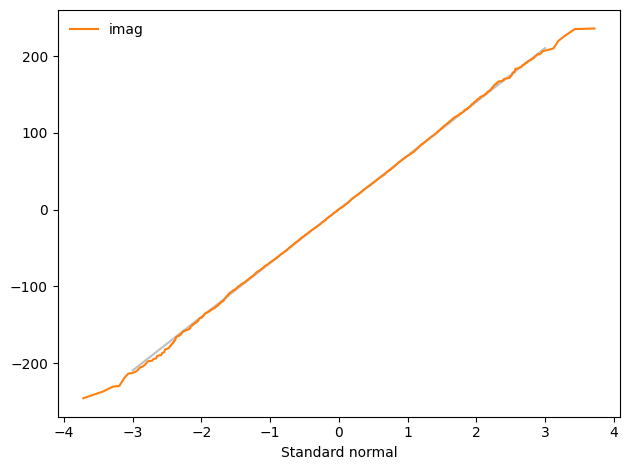
To test that claim, we can generate the spectrum of UG noise and then generate a “normal probability plot”, which is a graphical way to test whether a distribution is Gaussian.
from thinkdsp import UncorrelatedGaussianNoise
signal = UncorrelatedGaussianNoise()
wave = signal.make_wave(duration=0.5, framerate=11025)
wave.plot(linewidth=0.5)
decorate_time()
spectrum = wave.make_spectrum()
spectrum.plot_power(linewidth=1)
decorate_power()
import scipy.stats
from thinkdsp import decorate
def normal_probability_plot(sample, **options):
"""Makes a normal probability plot with a fitted line.
sample: sequence of numbers
options: passed to plot
"""
n = len(sample)
ps = (np.arange(n) + 0.5) / n
xs = scipy.stats.norm.ppf(ps)
ys = np.sort(sample)
results = scipy.stats.linregress(xs, ys)
intercept, slope = results.intercept, results.slope
fit_xs = np.linspace(-3, 3)
fit_ys = intercept + slope * fit_xs
plt.plot(fit_xs, fit_ys, color="gray", alpha=0.5)
plt.plot(xs, ys, **options)
decorate(xlabel="Standard normal")
normal_probability_plot(spectrum.real)
normal_probability_plot(spectrum.imag)
If you are not familiar with normal probability plots, you can read about them in Think Stats at http://thinkstats.com.
The gray lines show a linear model fit to the data; the dark lines show the data.
A straight line on a normal probability plot indicates that the data come from a Gaussian distribution. Except for some random variation at the extremes, these lines are straight, which indicates that the spectrum of UG noise is UG noise.
The spectrum of UU noise is also UG noise, at least approximately. In fact, by the Central Limit Theorem, the spectrum of almost any uncorrelated noise is approximately Gaussian, as long as the distribution has finite mean and standard deviation, and the number of samples is large.
We can use a normal probability plot to test the distribution of the power spectrum.
def normal_prob_plot(sample, fit_color='0.8', **options):
"""Makes a normal probability plot with a fitted line.
sample: sequence of numbers
fit_color: color string for the fitted line
options: passed along to Plot
"""
n = len(sample)
xs = np.random.normal(0, 1, n)
xs.sort()
ys = np.sort(sample)
mean, std = np.mean(sample), np.std(sample)
fit_ys = mean + std * xs
plt.plot(xs, fit_ys, color='gray', alpha=0.5, label='model')
plt.plot(xs, ys, **options)
normal_prob_plot(spectrum.real, color='C0', label='real part')
decorate_power()
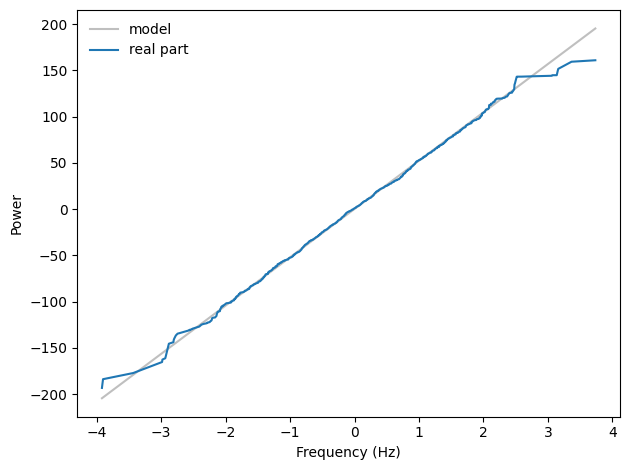
A straight line on a normal probability plot indicates that the distribution of the real part of the spectrum is Gaussian.
normal_prob_plot(spectrum.imag, color='C1', label='imag part')
decorate_power()
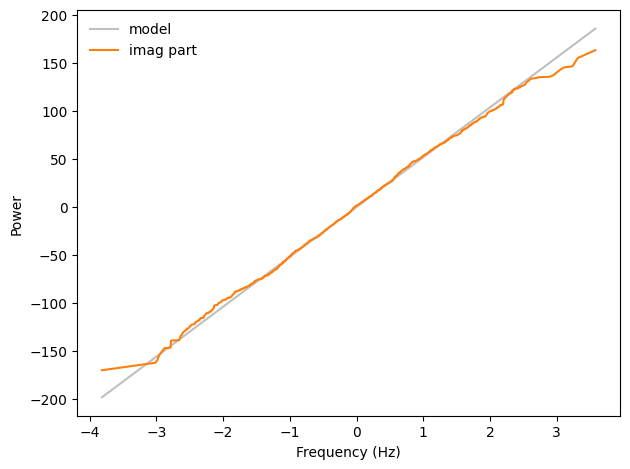
And so is the imaginary part.
4.6. Exercises#
4.6.1. Exercise 4.1#
``A Soft Murmur’’ is a web site that plays a mixture of natural noise sources, including rain, waves, wind, etc. At http://asoftmurmur.com/about/ you can find their list of recordings, most of which are at http://freesound.org.
Download a few of these files and compute the spectrum of each signal. Does the power spectrum look like white noise, pink noise, or Brownian noise? How does the spectrum vary over time?
I chose a recording of ocean waves.
I selected a short segment:
And here’s its spectrum:
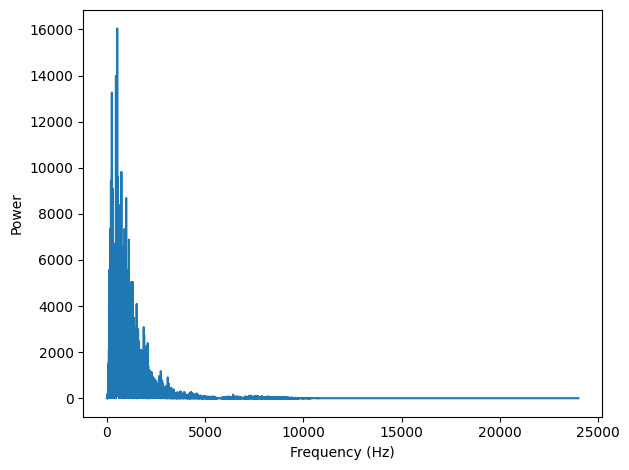
Amplitude drops off with frequency, so this might be red or pink noise. We can check by looking at the power spectrum on a log-log scale.
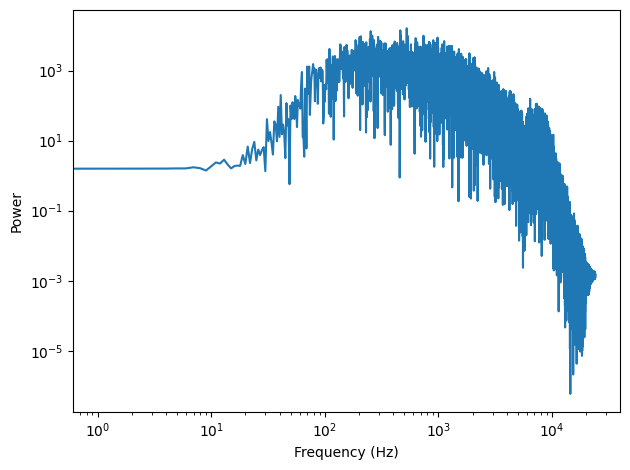
This structure, with increasing and then decreasing amplitude, seems to be common in natural noise sources.
Above \(f = 10^3\), it might be dropping off linearly, but we can’t really tell.
To see how the spectrum changes over time, I’ll select another segment:
And plot the two spectrums:
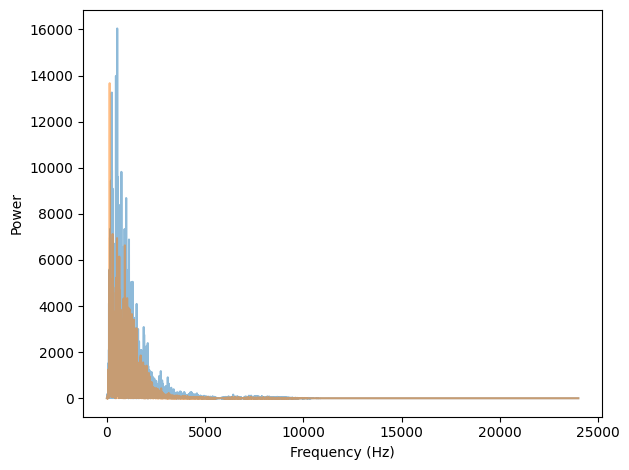
Here they are again, plotting power on a log-log scale.
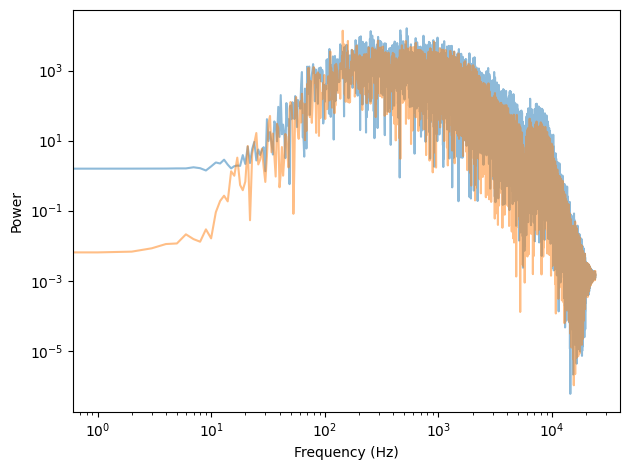
So the structure seems to be consistent over time.
We can also look at a spectrogram:
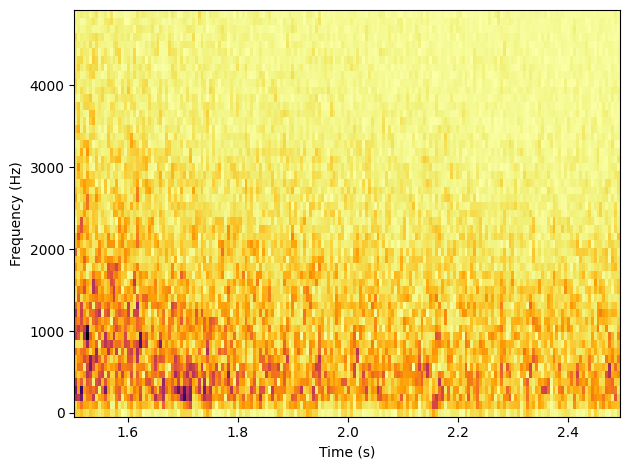
Within this segment, the overall amplitude drops off, but the mixture of frequencies seems consistent.
4.6.2. Exercise 4.1 (continued)#
In a noise signal, the mixture of frequencies changes over time. In the long run, we expect the power at all frequencies to be equal, but in any sample, the power at each frequency is random.
To estimate the long-term average power at each frequency, we can break a long signal into segments, compute the power spectrum for each segment, and then compute the average across the segments. You can read more about this algorithm at http://en.wikipedia.org/wiki/Bartlett’s_method.
Implement Bartlett’s method and use it to estimate the power spectrum for a noise wave.
Hint: look at the implementation of make_spectrogram.
Here’s my implementation:
bartlett_method makes a spectrogram and extracts spec_map, which maps from times to Spectrum objects.
It computes the PSD for each spectrum, adds them up, and puts the results into a Spectrum object.
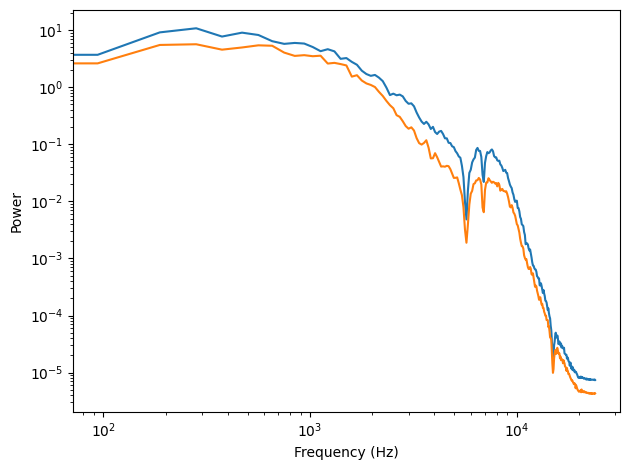
Now we can see the relationship between power and frequency more clearly. It is not a simple linear relationship, but it is consistent across different segments, even in details like the notches near 5000 Hz, 6000 Hz, and above 10,000 Hz.
4.6.3. Exercise 4.2#
At coindesk you can download the daily price of a BitCoin as a CSV file. Read this file and compute the spectrum of BitCoin prices as a function of time. Does it resemble white, pink, or Brownian noise?
Here’s how I analyzed it:
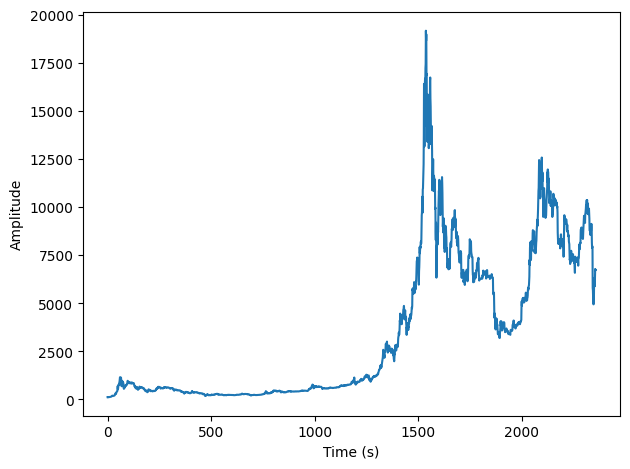
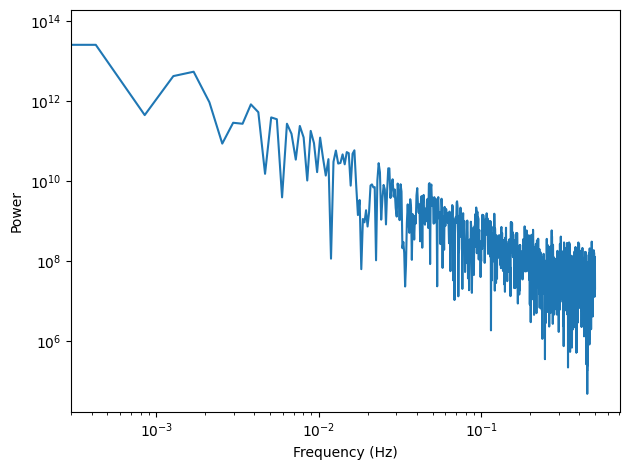
Red noise should have a slope of -2. The slope of this PSD is close to 1.7, so it’s hard to say if we should consider it red noise or if we should say it’s a kind of pink noise.
4.6.4. Exercise 4.3#
A Geiger counter is a device that detects radiation. When an ionizing particle strikes the detector, it outputs a surge of current. The total output at a point in time can be modeled as uncorrelated Poisson (UP) noise, where each sample is a random quantity from a Poisson distribution, which corresponds to the number of particles detected during an interval.
Write a class called UncorrelatedPoissonNoise that inherits from _Noise and provides evaluate.
It should use np.random.poisson to generate random values from a Poisson distribution.
The parameter of this function, lam, is the average number of particles during each interval.
You can use the attribute amp to specify lam.
For example, if the framerate is 10 kHz and amp is 0.001, we expect about 10 “clicks” per second.
Generate about a second of UP noise and listen to it. For low values of amp, like 0.001, it should sound like a Geiger counter.
For higher values it should sound like white noise.
Compute and plot the power spectrum to see whether it looks like white noise.
Here’s my implementation:
Here’s what it sounds like at low levels of “radiation”.
To check that things worked, we compare the expected number of particles and the actual number:
Here’s what the wave looks like:
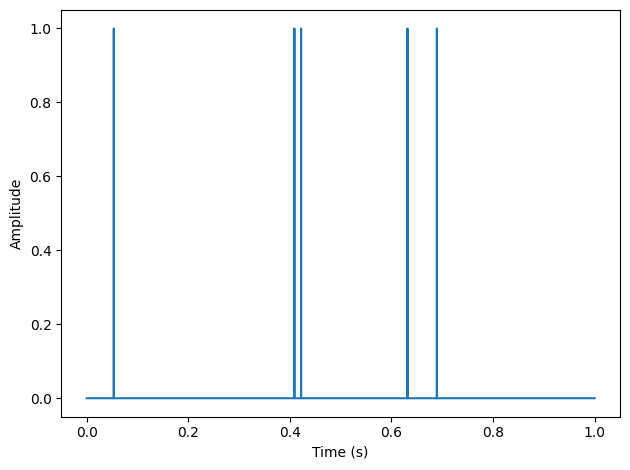
And here’s its power spectrum on a log-log scale.
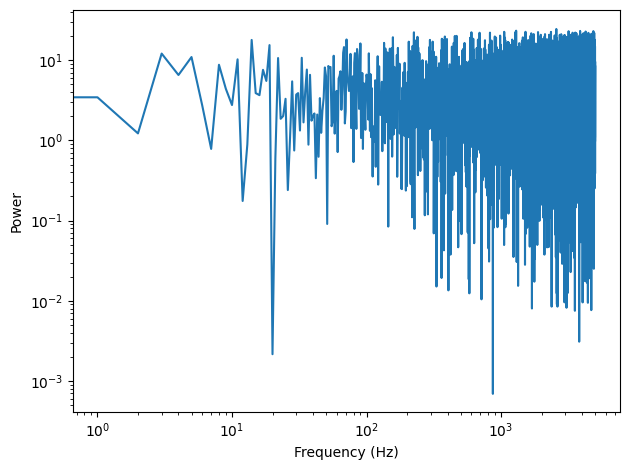
Looks like white noise, and the slope is close to 0.
With a higher arrival rate, it sounds more like white noise:
It looks more like a signal:
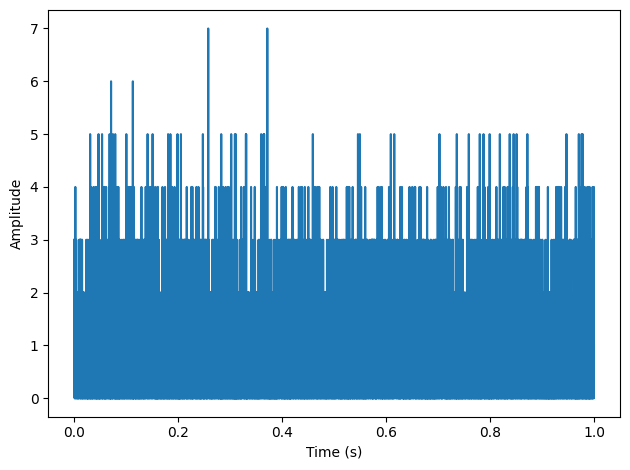
And the spectrum converges on Gaussian noise.
spectrum = wave.make_spectrum()
spectrum.hs[0] = 0
normal_probability_plot(spectrum.real, label='real')
normal_probability_plot(spectrum.imag, label='imag', color='C1')
4.6.5. Exercise 4.4#
The algorithm in this chapter for generating pink noise is conceptually simple but computationally expensive. There are more efficient alternatives, like the Voss-McCartney algorithm. Research this method, implement it, compute the spectrum of the result, and confirm that it has the desired relationship between power and frequency.
The fundamental idea of this algorithm is to add up several sequences of random numbers that get updates at different sampling rates. The first source should get updated at every time step; the second source every other time step, the third source ever fourth step, and so on.
In the original algorithm, the updates are evenly spaced. In an alternative proposed at http://www.firstpr.com.au/dsp/pink-noise/, they are randomly spaced.
My implementation starts with an array with one row per timestep and one column for each of the white noise sources. Initially, the first row and the first column are random and the rest of the array is Nan.
The next step is to choose the locations where the random sources change. If the number of rows is \(n\), the number of changes in the first column is \(n\), the number in the second column is \(n/2\) on average, the number in the third column is \(n/4\) on average, etc.
So the total number of changes in the matrix is \(2n\) on average; since \(n\) of those are in the first column, the other \(n\) are in the rest of the matrix.
To place the remaining \(n\) changes, we generate random columns from a geometric distribution with \(p=0.5\). If we generate a value out of bounds, we set it to 0 (so the first column gets the extras).
Within each column, we choose a random row from a uniform distribution. Ideally we would choose without replacement, but it is faster and easier to choose with replacement, and I doubt it matters.
Now we can put random values at rach of the change points.
Next we want to do a zero-order hold to fill in the NaNs. NumPy doesn’t do that, but Pandas does. So I’ll create a DataFrame:
And then use fillna along the columns.
Finally we add up the rows.
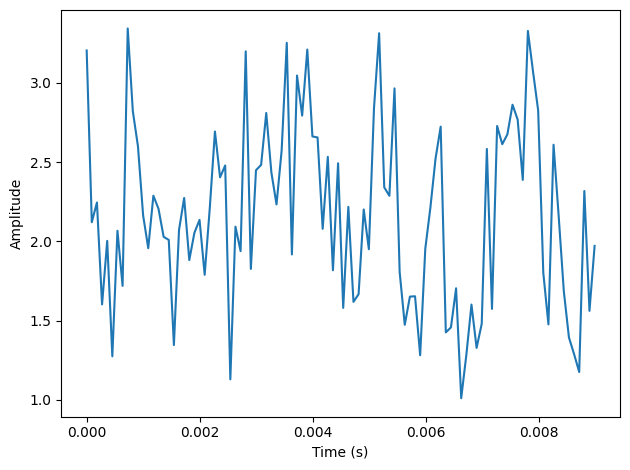
If we put the results into a Wave, here’s what it looks like:
Here’s the whole process in a function:
To test it I’ll generate 11025 values:
And make them into a Wave:
Here’s what it looks like:
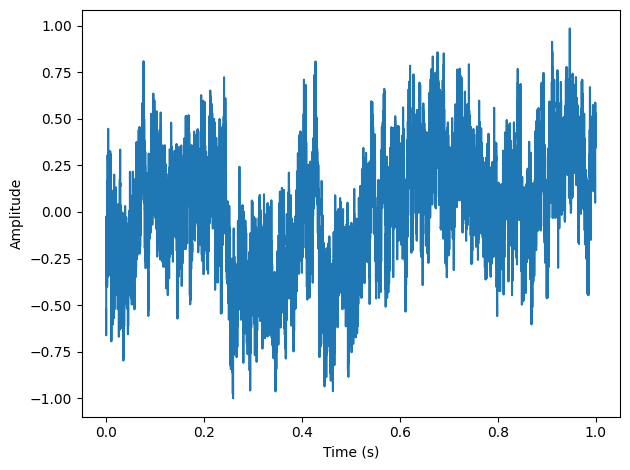
As expected, it is more random-walk-like than white noise, but more random looking than red noise.
Here’s what it sounds like:
And here’s the power spectrum:
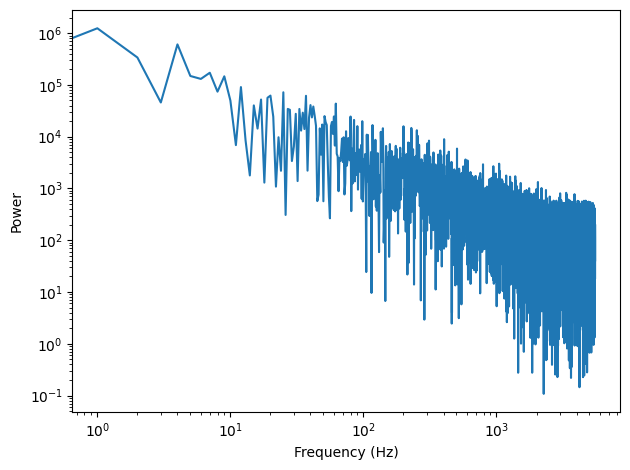
The estimated slope is close to -1.
We can get a better sense of the average power spectrum by generating a longer sample:
And using Barlett’s method to compute the average.
It’s pretty close to a straight line, with some curvature at the highest frequencies.
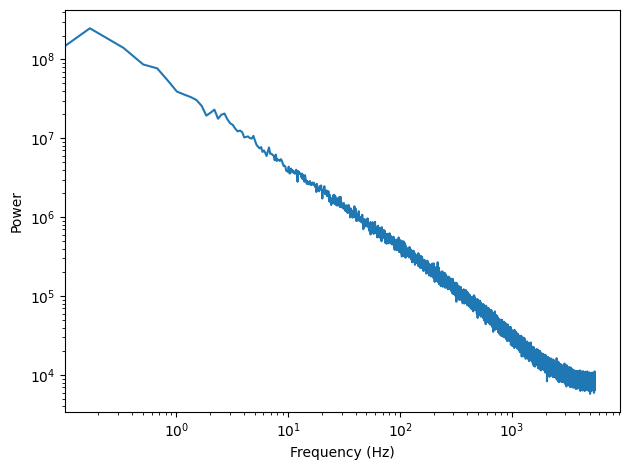
And the slope is close to -1.
Think DSP: Digital Signal Processing in Python, 2nd Edition
Copyright 2024 Allen B. Downey
License: Creative Commons Attribution-NonCommercial-ShareAlike 4.0 International